Sanskar Bhushankar — AI Instructor & Developer | Raj Computers Academy Mumbai
Full Stack Developer · AI Systems Designer · Instructor at Raj Computers Academy, Mumbai
 |
I'm Sanskar Bhushankar — a full stack developer and AI instructor based in Mumbai, currently teaching the Generative AI & Agentic AI program at Raj Computers Academy (est. 1996). I work at the intersection of AI, data science, and full stack development, with a focus on building practical, real-world AI systems rather than just using tools. I specialize in context engineering, AI systems design, and agent-based workflows — and I've structured everything I teach into this public knowledge base so students anywhere can learn alongside. |
|---|---|
| sanskar-bhushankar-6b1a49244 | |
| GitHub | Sanskar-Bhushankar |
| Linktree | sanskar_izz |
| Digital Garden | digital-garden-tdes.vercel.app |
About this course
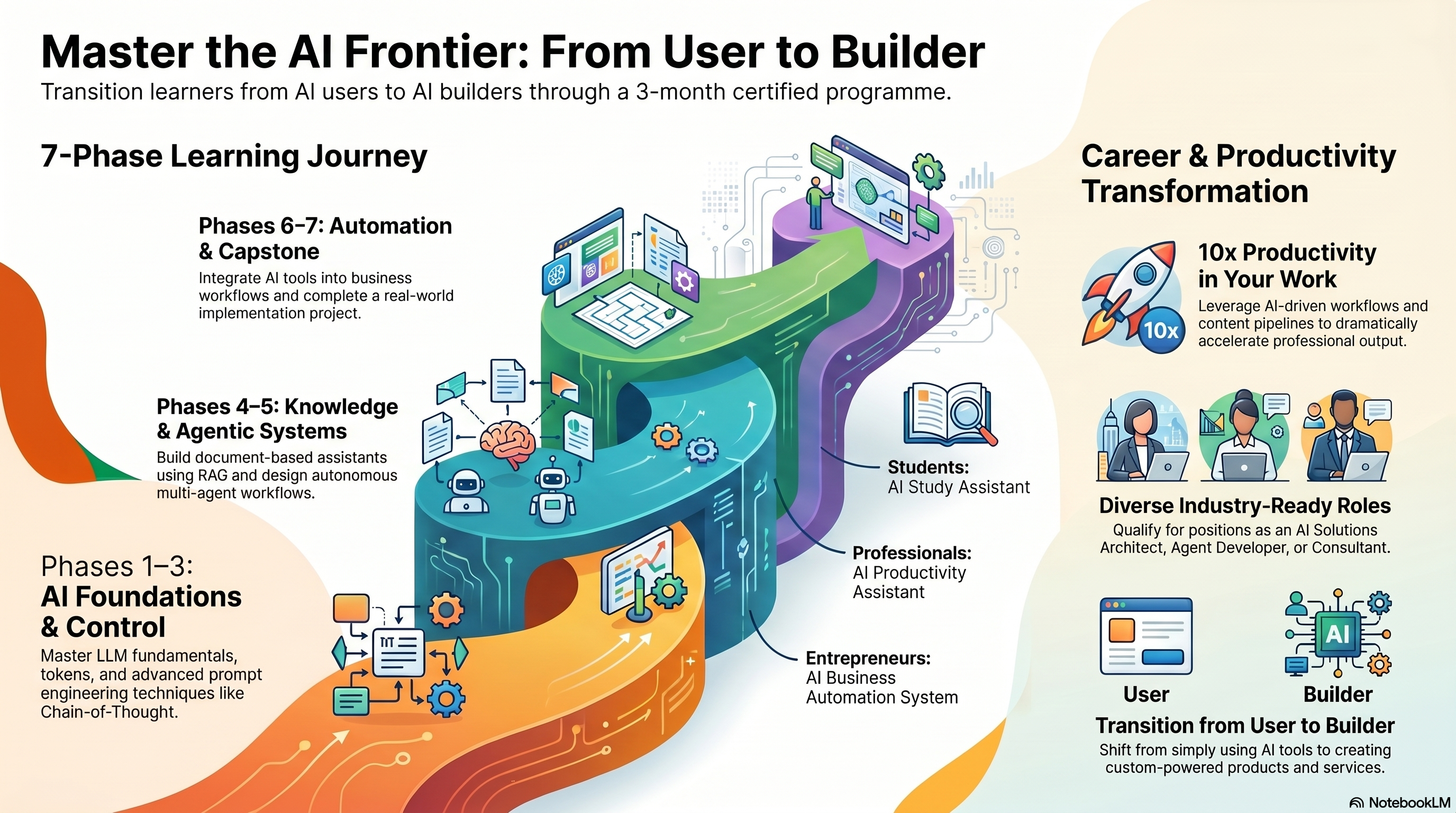
Most AI courses teach you to use tools. This one teaches you how those tools actually work — and then how to build your own.
The Certified Generative AI & Agentic AI Implementation Program at Raj Computers Academy is a 3-month, hands-on program designed for both technical and non-technical students. Whether you've never written a line of code or you're already a developer, the curriculum is structured to take you from understanding how Large Language Models process tokens and embeddings, all the way to building autonomous multi-agent systems that can plan, execute, and self-correct.
This isn't about prompting ChatGPT better. It's about understanding what's happening inside the model when you do — and using that understanding to design systems that actually work in production.
What you'll build
By the end of this program, you won't just understand AI — you'll have shipped real projects:
From the core curriculum:
- AI Study Assistant — a RAG-powered knowledge system that answers questions from your own documents, not the internet
- AI Productivity Assistant — context-aware automation that handles research, drafting, and decision support for professionals
- AI Business Automation System — end-to-end agentic workflows for lead generation, follow-ups, and reporting
Extended projects (beyond the brochure):
- n8n Automation Workflows — visual AI pipelines that connect your tools, APIs, and databases without writing backend code from scratch
- Calling Agents — voice-enabled AI agents that can handle inbound/outbound calls, triage queries, and escalate — the kind of thing most people don't even know is buildable
- Personalised AI Job Finder — an agent that reads your resume, scrapes live job listings, scores fit against your profile, and drafts custom cover letters. You define the criteria; the agent runs the loop
- Portfolio Website + Internet Presence Builder — deploy your own public-facing developer profile, built and published with AI assistance, structured to be found by recruiters and collaborators
What the program covers
Phase 1 — AI Foundations & LLM Understanding
Understand how Large Language Models actually work: tokenisation, attention mechanisms, embeddings, and why hallucination happens. Most people skip this phase and wonder why their AI systems behave unpredictably.
Phase 2 — Prompt Engineering & AI Control
Role-based prompting, Chain-of-Thought (CoT), structured prompting techniques, reusable prompt systems, and prompt-based automation. The difference between someone who "uses AI" and someone who controls it reliably.
Phase 3 — Generative AI Systems
Text, image, and video AI in production. Cross-modal workflows, AI content pipelines, business productivity automation, and AI-driven decision systems.
Phase 4 — Knowledge Systems (RAG)
Retrieval-Augmented Generation from first principles. Build document-based AI assistants and internal knowledge systems that answer from your data, not from hallucinated training knowledge.
Phase 5 — Agentic AI Systems
What AI agents actually are: memory architectures, planning loops, tool use, and autonomous execution. Multi-agent workflows with task distribution and orchestration. Introduction to agent frameworks — CrewAI and AutoGen.
Phase 6 — Automation & Deployment
AI + tools integration, business automation workflows with n8n, building simple AI apps, deployment basics, and UI design for AI tools.
Phase 7 — Capstone Project
Choose your track and ship something real.
What you can become after this
The program opens doors across three career paths:
AI & Technology Roles — Generative AI Specialist, AI Automation Expert, AI Agent Developer, Conversational AI Developer
Business & Strategy Roles — AI Consultant, AI Solutions Architect, Digital Transformation Specialist, Business Automation Expert
Freelancing & Entrepreneurship — AI Chatbot Developer, Automation Consultant, AI Content Specialist, AI Tool Builder — or launch your own AI-based business
How to use this digital garden
These notes are the living curriculum — updated as the course evolves. Each section contains structured notes, real prompt examples, and implementation walkthroughs. Treat it as your second brain for AI.
Explore by module below, or start from the beginning with Module 0 (setting up your own Obsidian knowledge base the way this one is built).
Before starting the course all must setup obsidian on there local pc or laptop and its whole guide is available on M0 - Second brain setup
Notes
Module 1 — AI Landscape & Transformation
| Notes | Topic |
|---|---|
| M0 - Second brain setup | Set up your own website and second brain |
| M1-A - The Intelligence Stack | AI vs manually described intelligence — the full stack from rules to agents |
| M1-B - Prompting as a Skill | Prompting as a skill — why precision beats cleverness |
| M1-C - Where AI Actually Matters | Where AI actually changes outcomes — and where it doesn't |
Module 2 — LLM Fundamentals
| Notes | Topic |
|---|---|
| M2-A - What is happening inside AI | How ai works behind the scenes |
| M2-B - How AI generates answers | what to do to get perfect response from AI |
| M2-C - Why AI makes mistakes | How and why AI makes mistakes |
| M2-D - How to use AI correctly | How u should use AI in the right way |
| M2-E - Final mental model | Summary of module 2 |
Module 3 — Advanced Prompt Engineering
| Notes | Topic |
|---|---|
| M3-A What is Prompt | Prompt engineering basics and structural prompt types |
| M3-B Role based prompting | Role-based prompting for consistent style and tone |
| M3-C Prompt Chaining | Multi-step prompts where each output feeds the next |
| (Assignment 1)Prompt designer Extenstion | Build a custom prompt template + answer 11 AI fundamentals questions |
| (Assignment 2 ) Linkedin evaluation with engineered prompt | Meta-prompt for recruiter-style LinkedIn profile review |
Module 4 — Prompt Systems & Automation
| Notes | Topic |
|---|---|
| M4-A — Reusable Prompt Systems | Save prompt templates as reusable .md systems |
| M4-B — Prompt-Based Automation | Chain prompts into repeat workflows |
| M4-C — AI Response Ruleset | System-wide rules for how AI should behave |
Module 5 — Multimodal AI Systems
| Notes | Topic |
|---|---|
| M5-A — Text Image and Video AI | How text, image, and video AI differ |
| M5-B — AI Content Pipelines | Step-by-step content factories with AI |
| M5-C — Cross-Modal Workflows | Jump between text → image → video in one project |
| Prompt Templates | Practical poster and photoshoot prompt templates |
| (Assignment 3) Google AI for marketing | Pomelli marketing campaign assignment |
| (Assignment 4) Build and deploy a landing page website | Build and deploy a landing page on Netlify |
Module 6 — AI Productivity Systems
| Notes | Topic |
|---|---|
| M6-A — AI for Decision-Making and Business Productivity | AI supports decisions — humans own judgment |
| M6-B — AI-Driven Workflows and Tools | Repeatable workflows and tool landscape |
| (Assignment) topics to learn for module 6 | Written review — human-in-the-loop and AI limits |
Module 7 — Retrieval-Augmented Generation (RAG)
| Notes | Topic |
|---|---|
| M7-A — What is RAG | RAG as an open-book exam for AI |
| M7-B — How RAG Works Behind the Scenes | Chunks, embeddings, and vector search |
| M7-C — RAG with NotebookLM | Hands-on RAG with Google NotebookLM |
| (Assignment) Solve Questions | Long-form Q&A on RAG, APIs, and databases |
Module 8 — AI Knowledge Assistants
| Notes | Topic |
|---|---|
| M8-A — Document-Based AI Assistants | Design a chat assistant over your documents |
| M8-B — Internal Knowledge Systems | Team wikis and institutional knowledge with AI |
Module 9 — AI Agents & Capabilities
| Notes | Topic |
|---|---|
| M9-A — What Are AI Agents | Chatbot vs agent — goals, tools, loops |
| M9-B — Memory Planning and Execution | The three engine parts of every agent |
| M9-C — Autonomous Workflows | Triggers, loops, and levels of autonomy |
| Open claw | Bonus — OpenClaw architecture with markdown memory |
Module 10 — Multi-Agent Workflows
| Notes | Topic |
|---|---|
| M10-A — When One Agent Is Not Enough | Why teams of specialised agents win |
| M10-B — Task Distribution and Orchestration | How orchestrators split and merge work |
Module 11 — Agent Frameworks (Intro)
| Notes | Topic |
|---|---|
| M11-A — CrewAI How It Works | CrewAI agents, tasks, crews — backend flow |
| M11-B — AutoGen Introduction | AutoGen group-chat agents vs CrewAI |
Bonus — Automation & Projects
| Notes | Topic |
|---|---|
| N8N install | n8n setup for visual AI automation (Module 12 preview) |
| Whatsapp analytics | Streamlit project — chat export analytics |
Full index with AI-generation descriptions → INDEX